
About Software Applications
Print Automation Software
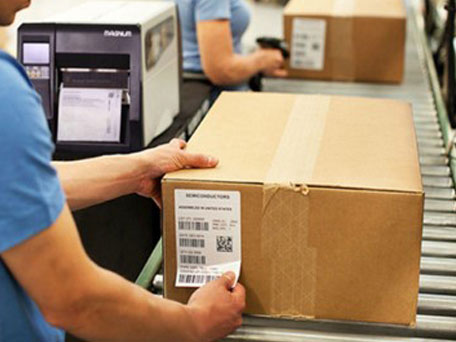
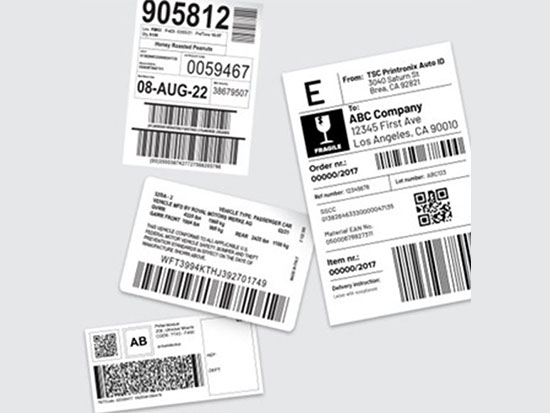
This software is designed to seamlessly integrate with leading ERP systems, such as SAP, Oracle, and others. It automatically retrieves relevant data—such as product details, batch numbers, or inventory information—based on user-defined parameters. Once the data is fetched, the software generates and prints barcode labels according to customizable templates, ensuring compliance with internal standards and streamlining operational workflows.
Template & Compliance Printing Software
Our software is engineered to generate and print labels in full compliance with various international and industry-specific standards, including UL (Underwriters Laboratories), CAS (Chemical Abstracts Service), GS1 (Global Standards for Barcodes), FDA (Food and Drug Administration), OSHA (Occupational Safety and Health Administration), BEE (Bureau of Energy Efficiency), and BIS (Buro of Indian Standards). It supports dynamic label generation by connecting to back-end databases, enabling real-time data integration for accurate and consistent labeling across manufacturing, packaging, and regulatory processes. The system ensures that all printed labels meet the required specifications for safety, traceability, and legal compliance."
Chemical Drum Labels Software
This software is designed to seamlessly integrate with major ERP systems such as SAP, Oracle, and others. It retrieves relevant data—such as chemical composition, hazard classifications, handling instructions, and batch details—directly from the ERP database. Using this data, the software generates and prints barcode labels that fully comply with the GHS (Globally Harmonized System of Classification and Labeling of Chemicals) standards. Additionally, it supports user-defined label formats, offering flexibility to meet specific operational or regulatory requirements. This ensures accurate, consistent, and compliant labeling for hazardous materials, enhancing workplace safety and global trade compliance.


Asset Management Solution
Our Asset Management Software helps organizations efficiently track, monitor, and manage physical and digital assets across their entire lifecycle. From acquisition to disposal, it provides real-time visibility, accurate recordkeeping, and streamlined maintenance scheduling.
Key Features:
- Centralized asset database with tracking via barcode, RFID, or GPS
- Lifecycle and maintenance management
- Automated alerts for servicing and compliance
- Integration with ERP and financial systems
- Role-based access and audit trails
Benefits:
- Reduced downtime and maintenance costs
- Improved asset utilization and accountability
- Easier audits and regulatory compliance
- Data-driven decision-making
Work In Progress
We recognize the challenges of managing work-in-progress within fast-paced manufacturing settings. Our cutting-edge WIP Tracking solutions provide real-time insights and control, enabling you to optimize every phase of production for maximum quality and efficiency. By harnessing advanced data capture and analytics technologies, we turn operational hurdles into tangible results.and global trade compliance.

Scanning Software & Automation
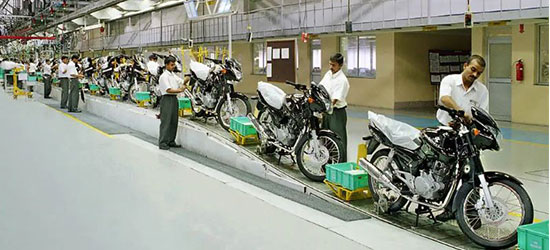
This suite of software solutions encompasses comprehensive data scanning capabilities across multiple operational areas, including warehouses, yards, and assembly lines. In warehouse environments, it enables real-time scanning of inventory and materials for accurate stock tracking and movement logging. Yard data scanning facilitates the monitoring and management of goods in open storage areas or logistics yards, ensuring seamless material flow and asset visibility. On assembly lines, the software supports product scanning with built-in validation mechanisms to verify part numbers, serial numbers, and production sequences. All scanned data is automatically validated and securely transferred to a centralized server, ensuring real-time data synchronization, traceability, and support for decision-making across the enterprise.
Printing Software with Test jig, PLC Integration
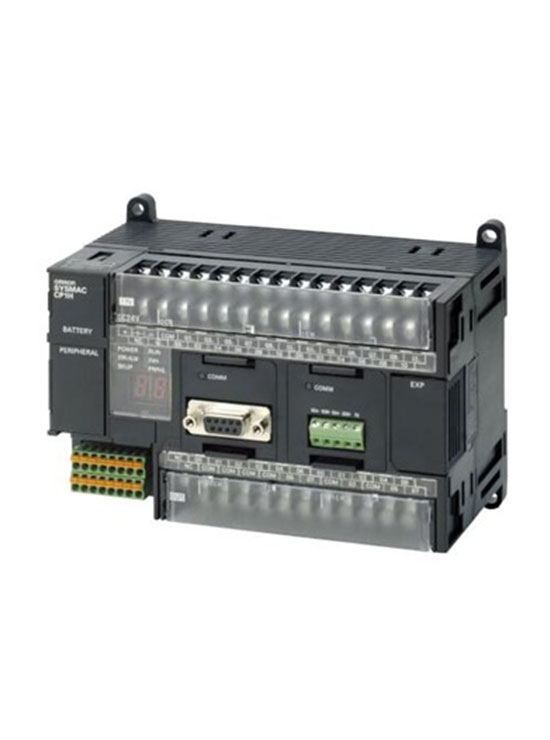
This software solution is designed to seamlessly connect legacy Test Jigs and PLCs (Programmable Logic Controllers) with modern label printing systems. In many manufacturing environments, older test equipment still performs critical quality checks on products. However, these systems often lack direct integration with newer automation tools. This software acts as a bridge, enabling communication between the legacy systems and current technology.
When a product undergoes testing through a Test Jig and meets the required specifications, the software detects the successful result via the connected PLC. It then automatically generates and prints a label containing key product information—such as serial numbers, batch codes, or compliance markings. This label is then affixed to the product, either manually or through automated labeling machines.
By automating the label printing process based on real-time test outcomes, the software reduces manual effort, minimizes errors, and ensures consistent labeling. It improves traceability, quality control, and operational efficiency, allowing manufacturers to maintain high standards while leveraging their existing infrastructure.
This software integrates legacy Test Jigs and PLCs (Programmable Logic Controllers) to automate label printing for products. When a product passes a test, the software triggers the printing of a label with product details, which is then applied to the product. It bridges older systems with modern technology to streamline testing and labelling in manufacturing.

Kitting & packing Software
This kitting & packing software helps customers pack as per a standard pack list. Each product is scanned and put in the box."
Types of kitting :
- Kitting & Packing Software: This software is designed to streamline and automate the process of assembling products (kitting) and preparing them for shipment (packing). It helps ensure that items are packed correctly and efficiently.
- Standard Pack List: A “pack list” is a detailed inventory or checklist of the products that should be included in a specific shipment or package. A “standard” pack list ensures consistency, meaning that the same items and quantities are always packed in the same way for each order or product type.
- Scanned Product: The software uses a scanning system (such as barcode or QR code scanning) to identify and track each product. This scanning step helps verify that the correct items are being packed according to the standard pack list, reducing errors and ensuring accuracy.
- Put in Box: Once the product is scanned, the software ensures it is placed in the appropriate box, as specified by the pack list. The system may guide the operator through each step, ensuring that the correct number and type of products are packed into the box before shipment.